
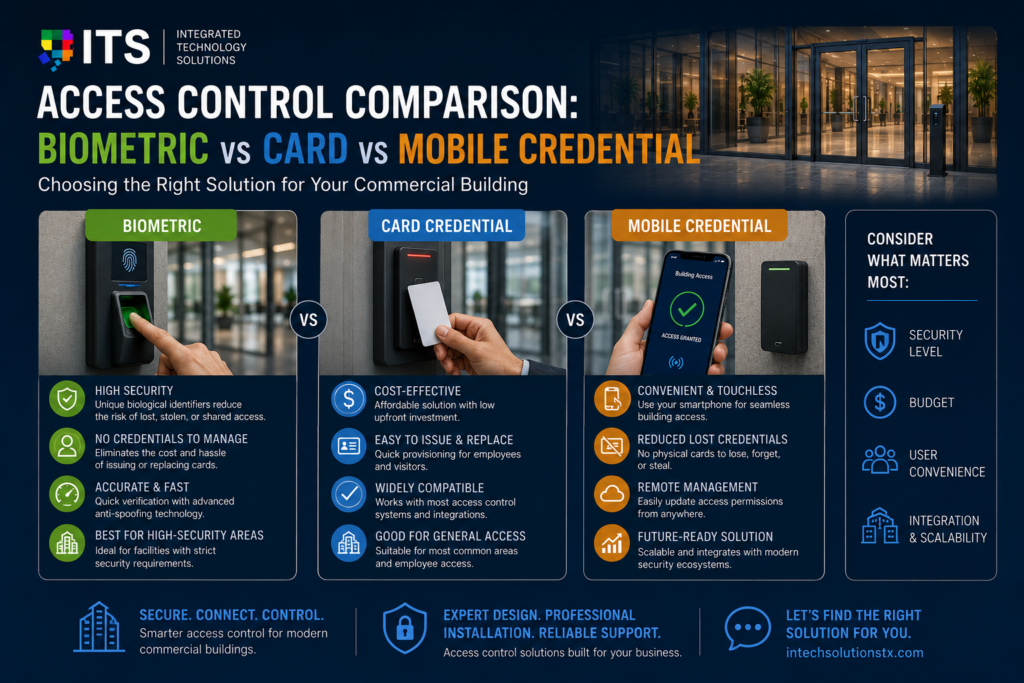
Choosing the right access control credential is one of the most consequential decisions in any commercial security project. The credential type determines how employees enter the building, how easy the system is to manage, how secure it is against unauthorized entry, and how much it costs to operate over time.
This access control comparison covers the three main credential technologies available to commercial buildings in 2026: key cards and fobs, mobile credentials on smartphones, and biometric readers using fingerprints or facial recognition. Each has genuine strengths and real limitations. The right choice depends on your building type, your security requirements, your user population, and your budget.
By the end of this access control comparison, you will have a clear framework for evaluating which credential type is right for your organization and where hybrid approaches make sense.
Why Credential Type Matters More Than Most Buyers Realize
Most access control purchasing decisions focus heavily on the control panel hardware, the software platform, and the door hardware. The credential itself is sometimes treated as an afterthought. That is a mistake.
The credential type determines the user experience for every person who enters your building every day. A credential that is difficult to use creates friction that reduces employee satisfaction and encourages workarounds that undermine security. A credential that is easy to share or copy defeats the purpose of having access control at all.
This access control comparison treats credential selection as the strategic decision it actually is, looking at security, convenience, manageability, cost, and the specific environments where each option performs best.
Option 1: Key Cards and Fobs
Key cards and fobs are the most widely deployed access control credential in commercial buildings worldwide. They have been the standard for decades and remain the most common choice for new installations in 2026.
How Key Card Access Control Works
A key card or fob contains a microchip and an antenna that communicate with a card reader via radio frequency. When the card is presented to the reader, the reader sends the card’s credential data to the access control panel, which checks it against the access database and either grants or denies entry.
Modern commercial key cards use RFID or smart card technology rather than older magnetic stripe technology. HID Global and ASSA ABLOY are the dominant manufacturers of commercial-grade credentials and readers. The most important standard to understand in any access control comparison is the difference between legacy 125 kHz proximity cards and modern 13.56 MHz smart cards.
125 kHz vs 13.56 MHz: A Critical Distinction
Legacy 125 kHz proximity cards are still widely installed but are no longer considered secure for commercial applications. They transmit a fixed, unencrypted credential number that can be read and cloned with inexpensive hardware available online. A bad actor with a concealed reader can clone a 125 kHz card in seconds without the cardholder knowing.
Modern 13.56 MHz smart cards use encrypted communication between the card and reader. The credential data is protected against cloning by cryptographic protocols. For any commercial security project that takes security seriously, 13.56 MHz smart cards are the minimum standard. Any access control comparison that does not address this distinction is incomplete.
Strengths of Key Card Access Control
• Widely understood: Every employee knows how to use a key card. No training required. Adoption is immediate.
• Fast to issue: New cards can be issued in minutes. Replacement for lost cards is simple.
• No smartphone required: Works for all employees regardless of device ownership or phone policy.
• Mature technology: Well-understood failure modes, wide installer support, and extensive track record.
• Low per-user cost: Modern smart cards typically cost between $3 and $8 per card in volume, making them cost-effective for large user populations.
Limitations of Key Card Access Control
• Cards can be lost, forgotten, or shared: A card that has been lent to a colleague or left in a jacket pocket does not provide the identity assurance that access control is supposed to deliver.
• Tailgating risk: A card grants access to a door but cannot prevent a second person from following the cardholder through. Tailgating is the most common way unauthorized individuals gain access in card-only environments.
• Physical management overhead: Lost cards must be deactivated and replaced. A high-turnover workforce generates significant card management workload.
• No identity verification: A card confirms that someone has the right card, not that they are the right person. The card itself is the credential, not the individual.
Option 2: Mobile Credential Access Control
Mobile credentials use a smartphone as the access control credential. Instead of carrying a key card, the user presents their phone to a Bluetooth or NFC-enabled reader. The phone communicates the credential to the reader, which processes the access decision in the same way as a card-based system.
Mobile credentials have been commercially available for over a decade but have matured significantly in recent years. In 2026, mobile credential technology is stable, widely supported by major access control platforms, and adopted by a growing number of enterprise organizations. For any current access control comparison, mobile credentials deserve serious evaluation.
How Mobile Access Control Works
The user installs a credential management app on their smartphone. The access control administrator assigns a digital credential to the user through the management platform, which is delivered to the app over the air. At the door, the user either taps their phone to the reader (NFC) or holds it near the reader within a short range (Bluetooth Low Energy).
Many mobile credential platforms also support hands-free access, where the reader detects the phone’s presence via Bluetooth and triggers an access decision without the user needing to take the phone out of their pocket. This can make mobile access faster than card access in practice.
Strengths of Mobile Credential Access Control
• Harder to share or clone: A digital credential stored on a phone is significantly more difficult to share than a physical card. Modern smartphones use biometric authentication to unlock the device, adding a passive identity check that card systems do not provide.
• Zero card inventory: No physical cards to order, print, distribute, or replace. Credentials are issued and revoked digitally in seconds.
• Instant remote management: An employee who is terminated can have their credential revoked remotely before they leave the parking lot. No card to chase down.
• Visitor management: Temporary credentials can be issued to visitors via email or SMS and expired automatically at the end of the visit.
• Employee preference: Most employees in 2026 would rather use their phone than carry an additional card. Mobile credentials reduce badge-related friction in the workplace.
Limitations of Mobile Credential Access Control
• Requires smartphones: Not all workforces are smartphone-equipped. Industrial environments, visitor populations, and certain regulated industries may have employees or contractors who cannot or should not use personal phones on site.
• Battery dependence: A phone with a dead battery cannot present a credential. Most mobile access platforms now support Power Reserve mode on Apple devices, but Android support varies.
• Slightly higher reader cost: Readers that support mobile credentials typically cost more than standard card readers. The premium is modest but real.
• BYOD and MDM complexity: Organizations with strict mobile device management policies may need to evaluate how the credential app interacts with their MDM platform before deployment.
Option 3: Biometric Access Control
Biometric access control uses physical characteristics to verify identity. The most common commercial security biometric technologies are fingerprint recognition and facial recognition, though iris scanning and palm vein recognition are used in certain specialized applications.
Commercial security biometric systems have matured significantly in recent years. Fingerprint readers have become faster, more accurate, and less sensitive to environmental conditions like moisture and cold. Facial recognition systems can now operate reliably in varying lighting conditions and at speed. The commercial security biometric market in 2026 is substantially more capable than it was five years ago.
How Biometric Access Control Works
During enrollment, the user’s biometric data is captured and stored as a mathematical template, not as a photograph or image. When the user presents their biometric at the reader, the system compares the live reading to the stored template and produces a match score. Access is granted if the score exceeds the configured threshold.
Most commercial security biometric systems allow administrators to configure the match threshold. A lower threshold accepts more matches with fewer rejections but also accepts more false positives. A higher threshold reduces false positives but increases the rate at which legitimate users are rejected. The right configuration depends on the security level required and the acceptable friction for users.
Strengths of Biometric Access Control
• Cannot be shared or transferred: A fingerprint cannot be lent to a colleague. A face cannot be given to a contractor. Commercial security biometric systems provide genuine identity verification that card and phone-based systems cannot.
• No credential to lose or forget: Users always have their biometric with them. There are no lost cards, dead batteries, or forgotten phones.
• Strongest available identity assurance: For high-security areas where it must be confirmed that the right person, not just the right credential, is entering, commercial security biometric is the only technology that delivers this.
• Eliminates credential management overhead: No cards to order, no apps to install, no credentials to distribute. Enrollment is the only setup step required per user.
Limitations of Biometric Access Control
• Higher hardware cost: Biometric readers cost significantly more than card or mobile readers. In a large facility with many access points, the hardware cost premium is substantial.
• Enrollment effort: Every user must be physically enrolled. For a large workforce, enrollment is a significant one-time project. For high-turnover environments, ongoing enrollment adds operational overhead.
• Environmental sensitivity: Fingerprint readers can be affected by dirty, wet, or injured fingers. Facial recognition can be affected by masks, heavy makeup, or extreme lighting conditions. The error rates are low but nonzero.
• Privacy considerations: Biometric data is uniquely personal. Unlike a lost card, a compromised biometric template cannot be reissued. Data handling, storage, and consent policies must be carefully designed.
• Slower throughput at high volumes: A fingerprint or facial scan takes longer than a card tap. At a high-traffic entry point where hundreds of employees arrive within a short window, biometric throughput can create bottlenecks.
Access Control Comparison: Head-to-Head Across Key Factors
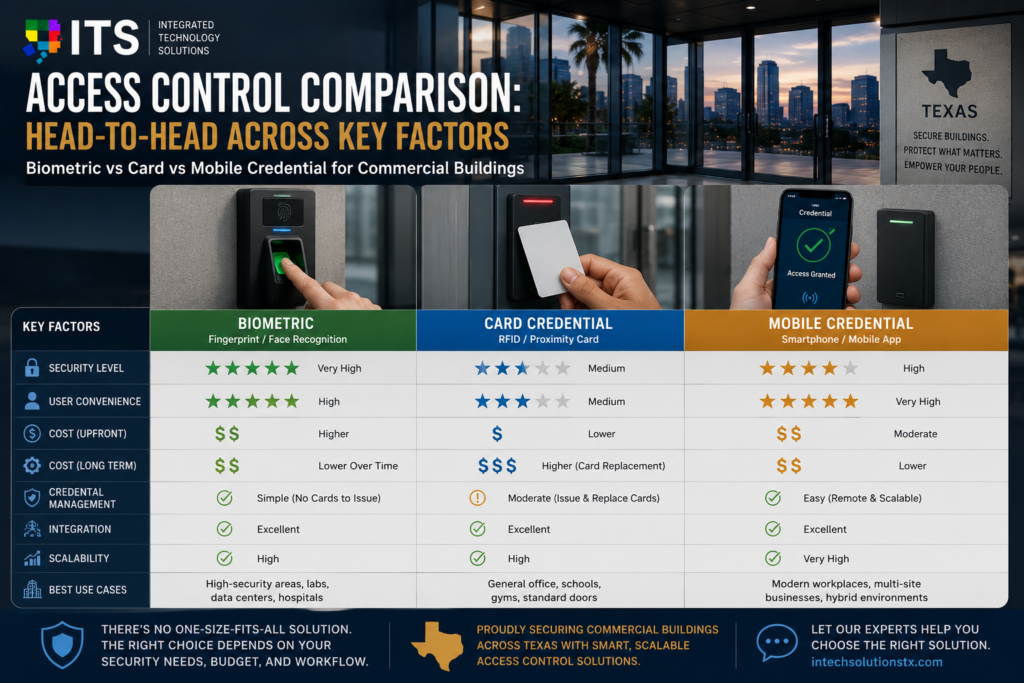
With each option understood individually, this access control comparison examines all three side by side across the factors that matter most to commercial security buyers.
Security Strength
Key card (13.56 MHz smart card): Strong. Encrypted communication prevents cloning. Still vulnerable to sharing between users.
Mobile credential: Strong to very strong. Device authentication adds a passive identity layer. Harder to share than a physical card.
Commercial security biometric: Highest available. Identity is verified, not just the credential. Cannot be shared, transferred, or cloned. The clear winner in this access control comparison category for high-security environments.
User Convenience
Key card: High. Familiar and fast. No learning curve. Works in all conditions.
Mobile credential: High to very high. Hands-free option makes it faster than cards in practice. Users prefer it. Dependent on battery and phone availability.
Commercial security biometric: Moderate to high. No credential to carry is genuinely convenient. Enrollment friction and occasional false rejections reduce the convenience score compared to card and mobile.
Management and Administration
Key card: Moderate. Cards must be physically issued and collected. Lost cards create immediate management tasks.
Mobile credential: Excellent. Fully digital credential lifecycle. Issue, update, and revoke credentials remotely in seconds. Easiest of the three in this access control comparison.
Commercial security biometric: Moderate. Enrollment is one-time effort per user. No ongoing credential distribution. High-turnover environments face recurring enrollment workload.
Upfront and Ongoing Cost
Key card: Lowest upfront hardware cost. Ongoing cost includes card replacement and printer consumables. Reader cost is the lowest of the three.
Mobile credential: Moderate upfront cost. Mobile-capable readers cost more than standard readers. Ongoing costs are low with no physical card management.
Commercial security biometric: Highest upfront cost. Biometric readers are the most expensive hardware option in this access control comparison. Total cost of ownership improves over time with no credential consumables.
Scalability
Key card: Excellent. Easy to add users and locations. No enrollment process beyond issuing a card.
Mobile credential: Excellent. Adding users requires only installing the app and issuing a digital credential. Multi-site deployment is straightforward.
Commercial security biometric: Moderate. Each new user requires physical enrollment. Adding a new location requires installing enrollment-capable hardware or arranging enrollment at a central point.
Best Fit Environments
Key card: Standard offices, multi-tenant buildings, retail, hospitality, education, healthcare administrative areas. Any environment where universal access and low per-user cost are priorities.
Mobile credential: Corporate offices, professional services, technology companies, enterprise campuses, any environment with a smartphone-equipped workforce and a preference for modern, card-free access.
Commercial security biometric: Data centers, server rooms, pharmaceutical facilities, financial institutions, government buildings, research labs, and any area where identity must be confirmed, not just the credential.
Multi-Factor Access Control: When One Credential Is Not Enough
The access control comparison above treats each credential type as a standalone solution. But many commercial security deployments use two-factor or multi-factor authentication by combining credential types.
Common multi-factor combinations in commercial security biometric and card deployments include:
• Card plus PIN: The most common two-factor combination. The card is something the user has. The PIN is something they know. Widely used in areas with elevated security requirements.
• Card plus biometric: Used in high-security areas like data centers and pharmaceutical vaults. The card provides the initial identification. The commercial security biometric confirms identity. This combination is standard in Tier 3 and Tier 4 data center access control.
• Mobile credential plus biometric: The phone presents the credential while facial recognition or fingerprint confirms identity. Increasingly common in enterprise office environments that want strong security without physical cards.
• Card plus mobile: Used in transition deployments where an organization is moving from cards to mobile but needs to maintain card support for users who have not yet migrated.
Multi-factor access control is the direction that serious commercial security programs are moving in 2026. The combination of something you have and something you are provides a significantly higher level of identity assurance than either factor alone.
Industry-Specific Guidance for This Access Control Comparison
The right credential choice also depends significantly on the industry your organization operates in. Here is how this access control comparison applies across common commercial sectors.
Corporate Offices and Professional Services
Modern corporate offices are increasingly choosing mobile credentials as their primary access control technology. The workforce is smartphone-equipped, the convenience benefit is tangible, and the management simplicity resonates with IT teams managing large, dynamic user populations. Key cards remain common in lobbies and visitor access scenarios, where a physical credential can be issued on the spot. Commercial security biometric is used selectively for server rooms, executive areas, and high-value asset storage.
Healthcare Facilities
Healthcare access control must balance security, speed, and the practical realities of clinical work. Staff wearing gloves frequently cannot use fingerprint readers effectively, which limits commercial security biometric deployment in clinical areas. Smart card access remains the dominant choice in healthcare because it works consistently across all conditions. Mobile credentials are growing in administrative and non-clinical areas. HIPAA compliance requirements make audit logging a critical requirement that all three credential types can meet when properly configured.
Data Centers
Data centers represent the strongest use case for commercial security biometric in any access control comparison. Mission-critical facilities where physical access to servers equals potential access to data require the highest level of identity assurance. Most serious data center deployments combine smart card or mobile credential at the building level with commercial security biometric at the server room or cage level, creating a tiered security model appropriate for the risk profile.
Retail and Hospitality
Retail and hospitality environments prioritize cost, simplicity, and the ability to manage high turnover efficiently. Smart card access control is the dominant choice in these sectors because of its low per-user cost and simple administration. Mobile credentials are growing in managed hotel environments. Commercial security biometric is used selectively for cash handling areas and back-office security, where identity verification adds meaningful protection against internal theft.
Industrial and Manufacturing
Industrial environments favor key cards because of their durability, simplicity, and compatibility with personal protective equipment. Workers wearing gloves cannot use fingerprint readers. Workers in environments where phones are restricted for safety or security reasons cannot use mobile credentials. Key cards remain the most practical primary access control technology in manufacturing and industrial settings, with commercial security biometric used selectively for controlled substance areas, server rooms, and executive access.
Privacy and Legal Considerations for Biometric Access Control in Texas
Commercial security biometric access control raises privacy and legal considerations that card and mobile credentials do not. Texas does not currently have a specific biometric information privacy law comparable to Illinois’ BIPA statute. However, federal privacy standards, contractual obligations, and evolving state regulations mean that any organization deploying commercial security biometric systems should document their biometric data practices carefully.
Best practices for commercial security biometric data governance in Texas commercial deployments include:
• Obtain written consent from employees before enrollment in any biometric access control system
• Store biometric templates in encrypted form on controlled infrastructure, not as raw images or photographs
• Define and document a retention and deletion policy for biometric data upon employee departure
• Provide employees with a clear explanation of how their biometric data is used, stored, and protected
• Review applicable federal regulations and industry-specific requirements before deployment in regulated sectors
How ITS Approaches Access Control Credential Selection
ITS does not take a one-size-fits-all approach to access control credential selection. The right answer depends on your building type, your workforce, your security requirements, and your budget. Our team works with clients to assess these factors before making a technology recommendation.
Most commercial deployments we work on use a tiered approach. Smart card or mobile credential at standard entry points. Commercial security biometric at high-security areas. Multi-factor at the most sensitive locations. This tiered model balances security, cost, and convenience in a way that a single credential type rarely achieves across an entire facility.
ITS installs all three credential types and manages the full project scope including cabling, hardware, software configuration, and system integration through our commercial security and electrical services. We also handle the structured network cabling that access control readers, controllers, and door hardware depend on.
Frequently Asked Questions About This Access Control Comparison
Can I use mobile credentials and key cards in the same system?
Yes. Multi-technology readers that accept both smart cards and mobile credentials are widely available. Most enterprise access control platforms support mixed credential types within the same system. This is how most organizations transition from cards to mobile: by deploying multi-technology readers and migrating users gradually.
Is facial recognition or fingerprint better for commercial security biometric?
It depends on the environment. Fingerprint is faster at high-throughput entry points and works well in controlled indoor environments. Facial recognition works at a distance, does not require physical contact, and performs better where employees may be wearing gloves. Many facilities use fingerprint in controlled access areas and facial recognition in lobbies and high-traffic entrances.
What happens if a mobile credential phone battery dies?
Most modern mobile access platforms support backup access methods. Apple devices running iOS 16 and later support Power Reserve mode, which allows NFC-based access credentials to function for several hours after the phone’s main battery is depleted. Android support varies by device and platform. Organizations deploying mobile credentials should have a backup access policy for power-dead scenarios.
How do I decide which credential is right for my building?
Start with your security requirements. If you need identity verification, commercial security biometric is required at some level. If your workforce is smartphone-equipped and you want card-free access, mobile credentials are a strong choice. If you need broad compatibility, low cost, and proven reliability across all conditions, smart cards remain the most practical option. A professional security consultant can help you model the right combination for your specific environment.
Does ITS serve businesses across Texas for access control installation?
Yes. ITS installs access control systems for commercial buildings across Houston, Dallas, Austin, San Antonio, and statewide. We support all three credential types and design tiered access control systems appropriate for each facility’s security requirements. Visit our access control systems services page for more detail on our installation capabilities.
For industry standards governing commercial access control systems and credential technology, the Security Industry Association (SIA) publishes guidelines on access control best practices, credential standards, and emerging technology requirements for commercial deployments.
Additional technical standards for commercial security biometric systems and identity verification are published by the National Institute of Standards and Technology (NIST), whose identity and access management guidance is widely referenced in both commercial and government security deployments.
Choose the Right Access Control System With ITS
This access control comparison has covered the three main credential technologies in commercial security today. Key cards offer proven reliability and universal compatibility. Mobile credentials offer management simplicity and modern convenience. Commercial security biometric offers the highest available level of identity assurance.
Most serious commercial security programs in 2026 use a combination of these technologies, matched to the security requirements of each access point rather than applying a single credential type everywhere. The result is a system that is secure where it needs to be, convenient where it can be, and cost-effective across the whole facility.
ITS designs and installs complete access control systems for commercial buildings across Texas and nationwide. We work with you to select the right credential mix, configure the right permissions, and install everything from readers and controllers to cabling and power infrastructure. You can also review our broader technology infrastructure services to see how access control fits into a complete commercial security strategy.
Contact Integrated Technology Solutions today to discuss access control for your commercial building. Call us at +1 888-985-5334 or visit our contact page to request a free site assessment and system recommendation.
