
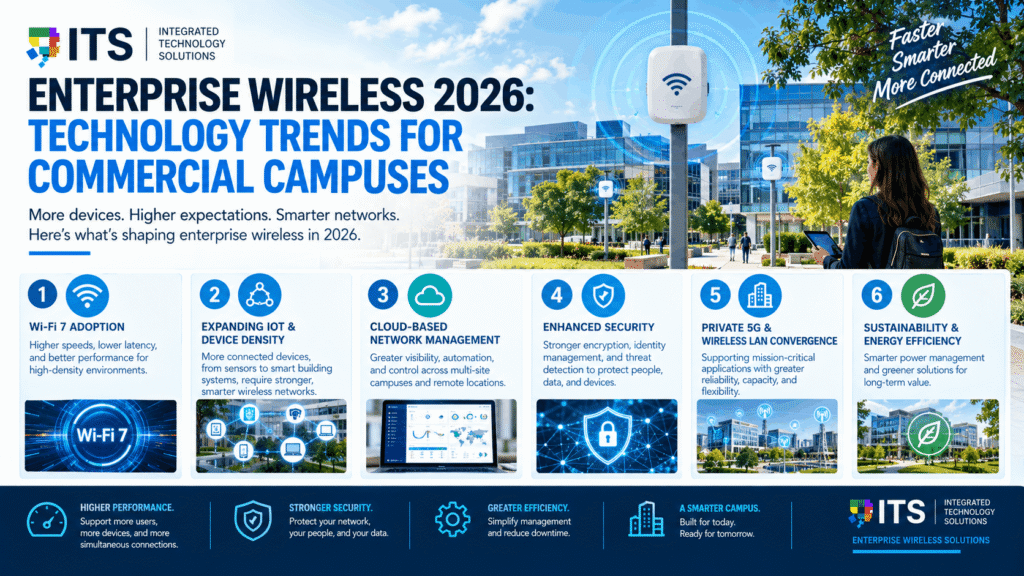
Enterprise wireless networks are changing faster than most IT teams can keep pace with. The devices connecting to corporate Wi-Fi are more numerous, more demanding, and more diverse than ever before. The applications running on those devices require lower latency, higher bandwidth, and more consistent performance. And the physical environments those networks must cover are becoming more complex.
Enterprise wireless 2026 is not just an incremental upgrade from the previous generation. Wi-Fi 7 commercial deployment is beginning in earnest. IoT device proliferation is changing how wireless networks are designed. AI-driven network optimization is moving from novelty to standard practice. And cybersecurity requirements for wireless infrastructure are stricter than they have ever been.
This guide covers the key enterprise wireless 2026 trends for commercial campuses, explains what Wi-Fi 7 commercial deployment actually means in practice, and helps Texas businesses and IT managers understand what to plan for in their wireless infrastructure investments this year and beyond.
The State of Enterprise Wireless in 2026
Enterprise wireless has gone through several distinct generational shifts. Each one changed what was possible for businesses and raised expectations for what a reliable corporate network should deliver.
Wi-Fi 6 (802.11ax), which became widely available around 2021, introduced features specifically designed for dense environments: OFDMA for more efficient spectrum use, BSS coloring to reduce interference between nearby networks, and Target Wake Time for IoT devices. Wi-Fi 6E extended these capabilities into the 6 GHz spectrum band, giving enterprise wireless significantly more available spectrum.
In enterprise wireless 2026, Wi-Fi 7 is now certified and commercially available. Enterprise access point vendors including Cisco, Aruba, Extreme, and others have launched Wi-Fi 7 products. The Wi-Fi 6E and Wi-Fi 7 chipset market is projected to grow from $33.65 billion in 2024 to approximately $149.65 billion by 2032, at a compound annual growth rate of over 20 percent. That growth trajectory reflects the scale of enterprise and commercial investment flowing into next-generation wireless infrastructure.
For commercial campuses in Texas and nationwide, enterprise wireless 2026 is the year that Wi-Fi 7 planning conversations move from forward-looking to actionable.
What Is Wi-Fi 7 and What Does It Mean for Commercial Campuses?
Wi-Fi 7, based on the IEEE 802.11be standard, is the most significant generational leap in wireless technology since Wi-Fi 6. Understanding what it actually delivers, beyond marketing claims, is essential for any IT manager evaluating a Wi-Fi 7 commercial deployment for their campus.
Maximum Throughput
Wi-Fi 7 supports theoretical maximum throughput of up to 46 Gbps, compared to Wi-Fi 6’s theoretical maximum of approximately 9.6 Gbps. In real-world enterprise deployments, actual throughput is always lower than theoretical maximums. But the ceiling matters because it determines how much headroom exists for traffic growth and high-demand applications.
For context, Wi-Fi 7 delivers up to 4.8 times faster performance than Wi-Fi 6 under comparable conditions. For enterprise wireless 2026 planning purposes, this means that a well-designed Wi-Fi 7 deployment provides a network that can handle the device densities and application demands of the next five to eight years without a generational upgrade.
Multi-Link Operation
Multi-Link Operation (MLO) is the most important new feature in Wi-Fi 7 for enterprise environments. Previous Wi-Fi generations connected a device to one radio band at a time. Wi-Fi 7 with MLO allows a device to simultaneously use multiple bands, for example 5 GHz and 6 GHz at the same time.
MLO delivers two key benefits for enterprise wireless 2026 deployments. First, it increases effective throughput by aggregating multiple band connections. Second, it dramatically reduces latency and improves reliability because data can be routed dynamically across whichever band has the least congestion at any moment. For latency-sensitive applications like video conferencing, real-time collaboration tools, and voice, MLO is a meaningful improvement.
320 MHz Channel Width
Wi-Fi 7 doubles the maximum channel width from 160 MHz in Wi-Fi 6E to 320 MHz. Wider channels carry more data simultaneously, which increases throughput for individual connections. The 320 MHz channels are only available in the 6 GHz band, which is one reason why 6 GHz spectrum availability matters so much for enterprise wireless 2026 planning.
4K-QAM Modulation
Wi-Fi 7 uses 4096-QAM modulation compared to Wi-Fi 6’s 1024-QAM. Each symbol in 4K-QAM carries 12 bits of data versus 10 bits, resulting in a 20 percent increase in theoretical data rate at the same radio frequency conditions. In practical terms, 4K-QAM delivers meaningfully better throughput in the close-range, high-signal-quality conditions typical of enterprise office environments.
Backward Compatibility
Wi-Fi 7 access points are backward compatible with Wi-Fi 6, Wi-Fi 6E, Wi-Fi 5, and older devices. A Wi-Fi 7 commercial deployment does not require every device on the network to be Wi-Fi 7 capable. Existing laptops, phones, and IoT devices continue to connect at their supported standard while newer Wi-Fi 7 devices benefit from the full capabilities of the new standard.
Is Now the Right Time for a Wi-Fi 7 Commercial Deployment?
This is the question most IT managers are wrestling with in enterprise wireless 2026 planning. Wi-Fi 7 is certified and hardware is available. But adoption in commercial enterprise environments is still in early stages. Here is an honest framework for evaluating timing.
Deploy Wi-Fi 7 Now If:
• You are building a new commercial space or doing a major renovation where wireless infrastructure will be installed fresh
• Your current wireless infrastructure is more than four to five years old and due for replacement regardless of Wi-Fi 7
• Your campus has high device density, latency-sensitive applications, or heavy video conferencing traffic that is straining current performance
• You are deploying AR, VR, or other immersive applications that require high throughput and low latency
• Your campus supports a large IoT device population that will benefit from improved spectrum management
Consider Waiting If:
• Your current Wi-Fi 6 or Wi-Fi 6E infrastructure is less than two years old and performing well
• Your device population is still predominantly Wi-Fi 5 and Wi-Fi 6 capable, with few Wi-Fi 7 client devices in use
• Your campus has low device density and current throughput demands are comfortably within Wi-Fi 6 capabilities
For most Texas commercial campuses planning enterprise wireless 2026 upgrades, the decision is not binary. Many organizations are deploying Wi-Fi 7 in high-density, high-priority areas while maintaining Wi-Fi 6 coverage in lower-demand zones. This phased approach manages cost while capturing the performance benefits where they matter most.
Top Enterprise Wireless 2026 Trends Beyond Wi-Fi 7
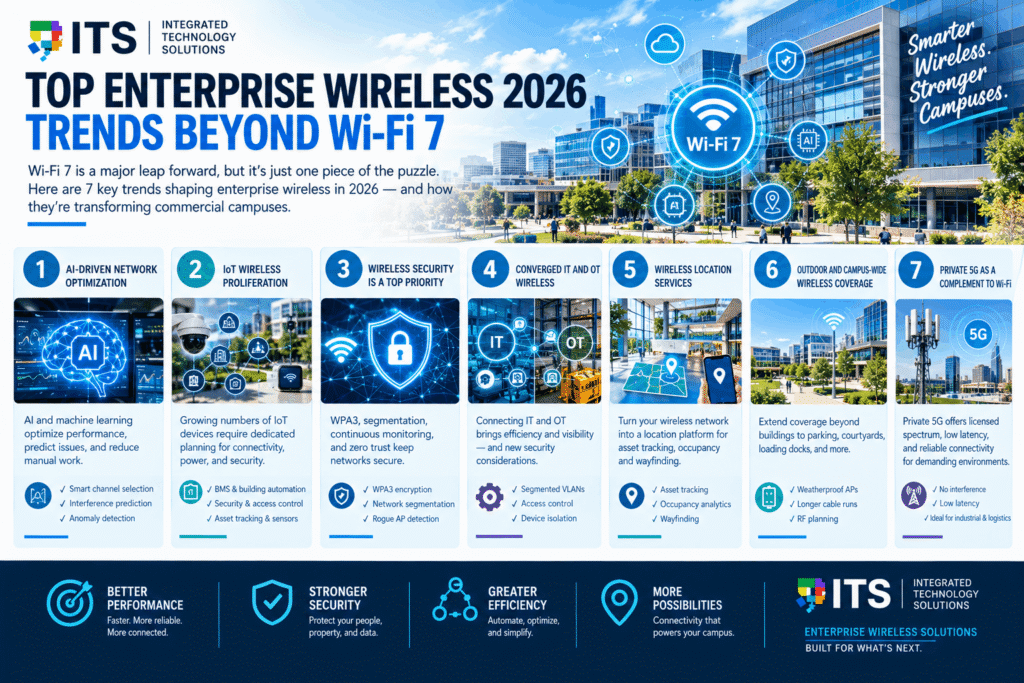
Wi-Fi 7 commercial deployment is the headline story in enterprise wireless 2026, but it is not the only significant trend. Several other developments are reshaping how commercial campuses approach wireless infrastructure this year.
Trend 1: AI-Driven Network Optimization
AI and machine learning are being integrated into enterprise wireless management platforms at an accelerating pace. In enterprise wireless 2026, AI-driven optimization covers several functions that previously required manual intervention or were simply not possible.
AI-powered access points can automatically adjust transmit power, channel selection, and client steering based on real-time network conditions. They can predict RF interference events before they degrade performance and proactively adjust to maintain coverage quality. They can identify anomalous traffic patterns that may indicate security threats.
For enterprise IT teams managing large commercial campuses, AI-driven wireless management dramatically reduces the manual configuration burden while producing better network performance than manual tuning achieves. Vendors including Cisco, Aruba, and Extreme have all integrated AI-based optimization into their enterprise wireless 2026 management platforms.
Trend 2: IoT Wireless Proliferation
The number of IoT devices connecting to enterprise wireless networks is growing faster than any other device category. Building automation sensors, environmental monitors, digital signage players, security cameras, access control readers, medical devices, and asset tracking systems all represent wireless connectivity requirements that did not exist or were minimal just a few years ago.
Enterprise wireless 2026 network design must account for IoT device populations specifically. IoT devices have different connectivity patterns, power profiles, and security requirements from human-operated devices. A wireless design optimized for laptops and phones may not serve IoT devices reliably, particularly in areas like mechanical rooms, stairwells, and loading docks where human users rarely go but sensors must communicate reliably.
Trend 3: Wireless Security Is a Top Priority
Enterprise wireless security requirements have increased significantly in recent years. WPA3 security is now the expected standard for commercial deployments, replacing the older WPA2 with stronger encryption and improved protections against offline dictionary attacks.
Beyond encryption standards, enterprise wireless 2026 security practices include strict network segmentation with separate SSIDs and VLANs for different device types, continuous wireless intrusion detection to identify rogue access points and suspicious clients, zero-trust network access principles applied to wireless authentication, and AI-based anomaly detection to flag unusual traffic patterns.
Wireless networks are increasingly being treated as a security perimeter that requires the same level of governance as wired network infrastructure. Enterprise IT teams that have not updated their wireless security architecture in the past two years should review it against enterprise wireless 2026 standards.
Trend 4: Converged IT and OT Wireless
The convergence of Information Technology (IT) and Operational Technology (OT) on shared wireless infrastructure is one of the more complex enterprise wireless 2026 trends for commercial campuses. Building automation systems, security systems, and operational monitoring equipment historically operated on separate proprietary wireless networks.
These systems are increasingly being connected to IP-based wireless networks for management, monitoring, and integration with enterprise platforms. This convergence creates efficiency and visibility benefits but also introduces security considerations. OT devices often have limited security capabilities and long replacement cycles that prevent rapid firmware updates. Isolating OT wireless traffic in segmented VLANs with strict access control is an essential best practice for any enterprise wireless 2026 deployment that includes OT devices.
Trend 5: Wireless Location Services
Enterprise wireless infrastructure is increasingly being used for more than connectivity. Wireless location services use the signal characteristics of devices on the network to determine their approximate physical location within a building. This capability enables asset tracking, occupancy analytics, and wayfinding applications without requiring separate hardware.
Wi-Fi 7’s MLO and enhanced spectrum management capabilities improve the accuracy of wireless location services by providing more signal data points and more consistent signal quality. For commercial campuses with large floor plates, campus-wide location services delivered through enterprise wireless 2026 infrastructure can eliminate the need for dedicated Bluetooth beacons or RFID infrastructure in many applications.
Trend 6: Outdoor and Campus-Wide Wireless Coverage
Enterprise wireless 2026 coverage requirements increasingly extend beyond building interiors. Outdoor courtyards, parking areas, loading docks, athletic facilities, and pedestrian pathways between buildings on multi-building campuses are all areas where commercial enterprises are extending managed wireless coverage. Outdoor wireless deployments require weatherproofed access points, longer cable runs, and careful RF planning to account for different propagation characteristics compared to indoor environments.
Trend 7: Private 5G as a Complement to Wi-Fi
Private 5G networks are emerging as a complement to Wi-Fi in certain enterprise wireless 2026 use cases. Private 5G provides licensed spectrum operation, which eliminates interference concerns from neighboring networks. It offers consistent, low-latency connectivity across large outdoor areas and in challenging RF environments like warehouses with metal racking. For industrial campuses, manufacturing facilities, and large logistics operations, private 5G is worth evaluating alongside Wi-Fi 7 as part of a complete enterprise wireless 2026 strategy.
Planning a Wi-Fi 7 Commercial Deployment: Key Considerations
A Wi-Fi 7 commercial deployment is not a plug-and-play upgrade. Several infrastructure and design considerations affect whether the deployment delivers the performance improvements that Wi-Fi 7 is capable of.
Cabling Infrastructure Requirements
Wi-Fi 7 access points have higher power and data throughput requirements than previous generations. Multi-gig Ethernet uplinks are recommended for Wi-Fi 7 access points in high-density environments. This means the Cat6A cabling running from each access point to the nearest network switch must be capable of supporting the speeds that Wi-Fi 7 generates.
Cat6A is the correct specification for enterprise wireless 2026 deployments. Cat5e and Cat6 cabling may limit the performance of Wi-Fi 7 access points in high-traffic scenarios. Buildings with aging copper cabling infrastructure should evaluate whether a cabling upgrade is needed as part of their Wi-Fi 7 commercial deployment. ITS provides full structured network cabling services that support the bandwidth requirements of Wi-Fi 7 and next-generation enterprise wireless deployments.
PoE Budget and Switching Infrastructure
Wi-Fi 7 access points consume more power than Wi-Fi 6 access points. Many Wi-Fi 7 enterprise access points require PoE++ (802.3bt) at up to 90 watts per port to operate all radios at full power. This has two implications.
First, the network switches powering the access points must support 802.3bt PoE and have sufficient total PoE budget for all connected access points. Organizations planning a Wi-Fi 7 commercial deployment should audit their switching infrastructure for PoE++ capability before finalizing hardware selection.
Second, the Cat6A cabling must be capable of carrying the full power delivery without excessive heat buildup in bundled cable runs. Cat6A’s superior thermal characteristics compared to Cat6 in high-density cable bundles make it the correct choice for PoE-heavy deployments.
6 GHz Spectrum and Regulatory Considerations
Wi-Fi 7’s highest-performance capabilities depend on access to the 6 GHz spectrum band. In the United States, the FCC has made 1,200 MHz of 6 GHz spectrum available for unlicensed use, which is available for Wi-Fi 7 commercial deployment without additional licensing.
However, the 6 GHz band requires Automated Frequency Coordination (AFC) for standard power access points deployed outdoors. Indoor deployments use low-power mode, which does not require AFC but has reduced range compared to standard power operation. Enterprise wireless 2026 deployment designs must account for these regulatory requirements when planning indoor-to-outdoor coverage extension.
Access Point Density and Placement
Wi-Fi 7’s multi-link operation and wider channel widths are most beneficial in high-density environments where many devices need simultaneous access. Access point placement in enterprise wireless 2026 deployments should be optimized using predictive wireless survey tools before installation, followed by a physical validation survey after installation. Placing access points based on gut feel or generic rules of thumb consistently produces coverage gaps and performance problems that are expensive to fix in an occupied building.
Network Segmentation for Wi-Fi 7 Environments
A Wi-Fi 7 commercial deployment typically involves multiple SSIDs serving different device populations: corporate laptops and phones, guest users, IoT sensors, and operational technology systems. Each population should have its own VLAN and its own security profile. The performance advantages of Wi-Fi 7 do not offset the security risks of mixing device types on a flat, unsegmented wireless network.
Enterprise Wireless 2026 for Different Campus Types
The specific enterprise wireless 2026 priorities vary by campus type. Here is how the trends and planning considerations apply across the most common commercial environments.
Corporate Office Campuses
Corporate office campuses are the highest-priority environment for Wi-Fi 7 commercial deployment in enterprise wireless 2026. The combination of hybrid work, video conferencing, high device-per-employee ratios, and growing IoT device populations has pushed Wi-Fi 6 networks in many corporate environments close to capacity.
For corporate campuses, enterprise wireless 2026 planning should prioritize conference rooms and collaboration spaces where video conferencing performance is most critical, high-density open office areas where simultaneous device connections are concentrated, and coverage in outdoor courtyard and campus pathway areas where employees increasingly work.
Healthcare Campuses
Healthcare is one of the most demanding environments for enterprise wireless 2026 deployments. Medical device connectivity, electronic health record systems, nurse call systems, real-time location services for equipment tracking, and patient wireless access all run on the same network infrastructure.
Healthcare wireless deployments must meet HIPAA security requirements and must perform reliably in environments with high RF interference from medical equipment. Wi-Fi 7’s improved interference management and multi-link operation are meaningful advantages in hospital environments where RF conditions are challenging.
Education Campuses
University and large K-12 campuses have some of the most demanding wireless requirements of any enterprise wireless 2026 environment. Peak concurrent device loads during class changes can reach several thousand devices connecting simultaneously in a small geographic area.
Wi-Fi 7’s OFDMA enhancements and MLO capability both directly address the high-density connection challenge that plagues large education campuses during peak periods. For universities planning new building construction or major renovations in 2026, Wi-Fi 7 should be the specified standard for all new wireless infrastructure.
Industrial and Logistics Campuses
Industrial campuses, distribution centers, and manufacturing facilities present unique enterprise wireless 2026 challenges. Large open floor plates with metal racking and equipment create challenging RF propagation environments. Forklift-mounted terminals, barcode scanners, wearable devices, and mobile robots all need reliable wireless connectivity that functions in motion across the entire facility. Industrial wireless deployments in 2026 often combine Wi-Fi 7 for high-throughput applications with specialized IoT protocols for lower-bandwidth sensor applications.
Infrastructure Checklist for Enterprise Wireless 2026 Readiness
Before deploying Wi-Fi 7 or any major enterprise wireless upgrade in 2026, run through this infrastructure readiness checklist.
• Cabling: Confirm all access point drops are Cat6A. Cat5e or Cat6 may limit performance of multi-gig Wi-Fi 7 access points.
• PoE capacity: Verify switching infrastructure supports 802.3bt PoE++ and has sufficient total PoE budget for all planned access points.
• Multi-gig switching: Confirm access-layer switches support 2.5G or 5G Ethernet uplinks to access points in high-density areas.
• Conduit and pathway capacity: Verify conduit and cable trays have capacity for additional access point drop cables if access point count is increasing.
• Network segmentation: Confirm VLAN and firewall policy infrastructure supports the segmented wireless architecture planned for the deployment.
• Wireless survey: Conduct a predictive wireless survey before access point procurement to validate placement and count for the planned coverage objectives.
• Security architecture: Confirm WPA3 is enabled, wireless intrusion detection is active, and IoT devices are segmented from corporate traffic.
ITS designs and installs complete enterprise wireless 2026 deployments including all supporting infrastructure. Our managed wireless and Wi-Fi services cover predictive survey design, Cat6A cabling for access point drops, enterprise access point installation, network configuration, and post-installation validation surveys.
Frequently Asked Questions: Enterprise Wireless 2026
Should we upgrade to Wi-Fi 7 now or wait?
If your wireless infrastructure is more than four years old or you are building or renovating, deploy Wi-Fi 7 now. If your Wi-Fi 6 or Wi-Fi 6E infrastructure is relatively new and performing well, waiting another 12 to 18 months will give the Wi-Fi 7 ecosystem more time to mature while your existing investment continues to deliver value.
Do our existing devices work with Wi-Fi 7 access points?
Yes. Wi-Fi 7 access points are backward compatible with Wi-Fi 6, Wi-Fi 6E, Wi-Fi 5, and older devices. Existing laptops and phones connect and function normally. They simply do not take advantage of Wi-Fi 7’s MLO and wider channel features until they are replaced with Wi-Fi 7 capable devices.
What cabling do we need for Wi-Fi 7 access points?
Cat6A is the correct specification. Cat6A supports multi-gig Ethernet and handles the higher PoE power requirements of Wi-Fi 7 access points without heat buildup concerns in bundled cable runs. Buildings with Cat5e or Cat6 cabling may need to evaluate a cabling upgrade as part of their Wi-Fi 7 commercial deployment planning.
How many access points do we need for a Wi-Fi 7 deployment?
Access point count depends on building size, layout, ceiling height, device density, and coverage objectives. A predictive wireless survey is the correct tool for determining access point count before hardware is purchased. Generic rules of thumb produce results that are either over-built and wasteful or under-built and inadequate.
Does ITS install Wi-Fi 7 enterprise wireless systems?
Yes. ITS designs and installs enterprise wireless 2026 deployments including Wi-Fi 7 systems for commercial campuses across Texas and nationwide. We handle predictive survey design, Cat6A cabling, access point installation, network configuration, and post-installation validation. Contact our team to discuss your campus wireless requirements.
For the authoritative technical specifications governing Wi-Fi 7 and enterprise wireless standards, the Wi-Fi Alliance publishes the Wi-Fi CERTIFIED 7 program requirements and the complete specification for IEEE 802.11be. Their certification database allows enterprises to verify that specific hardware has passed interoperability testing before purchasing.
The BICSI organization also publishes installation guidelines for wireless network infrastructure, including cabling standards for access point drops and equipment room design for wireless deployments. Their TDMM manual is the reference document for low-voltage infrastructure professionals designing enterprise wireless 2026 deployments.
Plan Your Enterprise Wireless 2026 Upgrade With ITS
Enterprise wireless 2026 is a pivotal year for commercial campus wireless technology. Wi-Fi 7 commercial deployment is moving from early adopter to mainstream enterprise consideration. AI-driven network optimization is maturing into a standard platform feature. IoT wireless demands are accelerating. And security requirements for wireless infrastructure have never been more important.
The organizations that plan their enterprise wireless 2026 upgrades with the right infrastructure, the right access point placement, and the right security architecture will have a wireless network capable of supporting their business for the next five to eight years. Those that do not will be managing performance and coverage problems while their competitors operate on technology built for the demands of this decade.
ITS designs and installs enterprise wireless systems for commercial campuses across Texas and nationwide. We bring predictive survey design, BICSI certified cabling installation, enterprise platform expertise, and post-installation validation to every project. Explore our managed wireless and Wi-Fi services and our full technology infrastructure services to see everything we deliver.
Contact Integrated Technology Solutions today to discuss your enterprise wireless 2026 upgrade. Call us at +1 888-985-5334 or visit our contact page to schedule a free wireless assessment for your campus.
